
Repository
A repository is an archive in DocuWare that ECM-Connect files documents into and reads them from. Before anything can be archived, at least one repository has to exist and its connection has to be verified.
What is this for?
- Establish and name the connection to the DocuWare server.
- Define which cabinet is used and which search and result list is read.
- Optionally define a basket as a staging area for documents not yet filed.
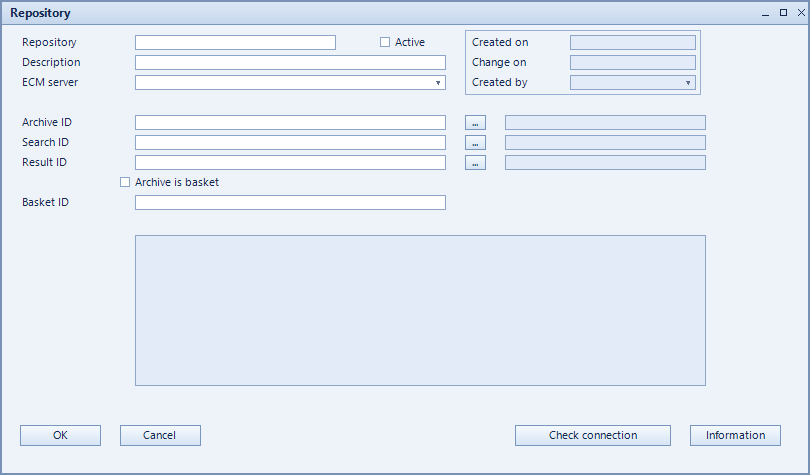
How to set it up
- Create a new record and give it a meaningful code and description.
- Select the ECM server – the server connections come from the NCS-Webservice configuration.
- Enter the cabinet ID of the DocuWare archive plus the search ID and result ID of the search and result list to use.
- When working with a basket, tick Archive is BASKET and provide the basket ID.
- Use Connection test to verify the connection, then set the record active.
Fields of the form
Captions taken from the "Repository" form (table @NCSTOAAR).
| Field | Meaning |
|---|---|
| Active | Enables the record. Only active records are evaluated. |
| Repository | Repository being used. |
| Description | Descriptive name of the record. |
| ECM server | The DocuWare server used for this repository. |
| Cabinet ID | Identifier of the DocuWare cabinet holding the documents. |
| Search ID | Identifier of the DocuWare search used to find documents. |
| Archive is BASKET | Marks the target as a basket instead of an archive. |
| Basket ID | Identifier of the basket when one is used. |
| Auto-archive green docs | Documents that passed all checks are filed without further confirmation. |
| Result ID | Identifier of the result list belonging to the search. |
| Connection test | Immediately checks whether the entered data yields a working connection. |
| Information | Additional notes about the record. |