
Booking rules
A booking rule defines how an incoming document is posted – depending on business partner, payment method, tax code and further criteria. This turns a recognised incoming invoice into a correctly assigned posting.
What is this for?
- Control postings depending on the business partner and further attributes.
- Define recurring account assignments once instead of entering them every time.
- Use amount limits to control up to which value posting happens automatically.
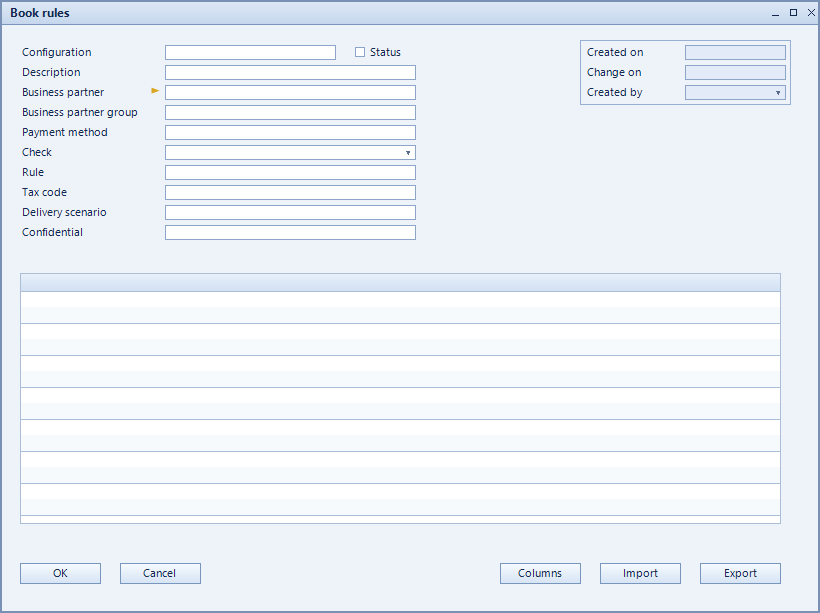
How to set it up
- Create the rule and assign the business partner it applies to.
- Restrict by pay method, tax code and delivery scenario where needed.
- Define the rule columns via columns and reorder them with up / down.
- Set when the rule applies under check on and activate the record.
Fields of the form
Captions taken from the "Book rules" form (table @NCSBOOKRULES).
| Field | Meaning |
|---|---|
| Code | Unique key of the record. |
| Description | Descriptive name of the record. |
| Business partner | Business partner the rule applies to. |
| Business partner group | |
| Pay method | Payment method as an additional criterion. |
| Check on | Point in time or event when the rule is evaluated. |
| Active | Enables the record. Only active records are evaluated. |
| Tax code | Tax code applied or checked. |
| Delivery scenario | Delivery scenario as a further criterion. |
| Confidential | Marks the rule as confidential. |
| Columns | Opens the column definition of the rule. |
Related settings
| Code | Name | Type | Default |
|---|---|---|---|
ECMBOOKLIMITITEM | Amount limit for automatic booking of item documents | Decimal | 0,00 |
ECMBOOKLIMITSERVICE | Amount limit for automatic booking of service documents | Decimal | 0,00 |
Every other setting is listed in the full reference.