
Email accounts
Through an email account ECM-Connect fetches messages and their attachments automatically and files them in the archive. Documents that arrive by mail therefore reach the archive without being saved by hand.
What is this for?
- Monitor a mailbox and archive attachments automatically.
- Use filters to control which messages are processed at all.
- Optionally notify the sender automatically.
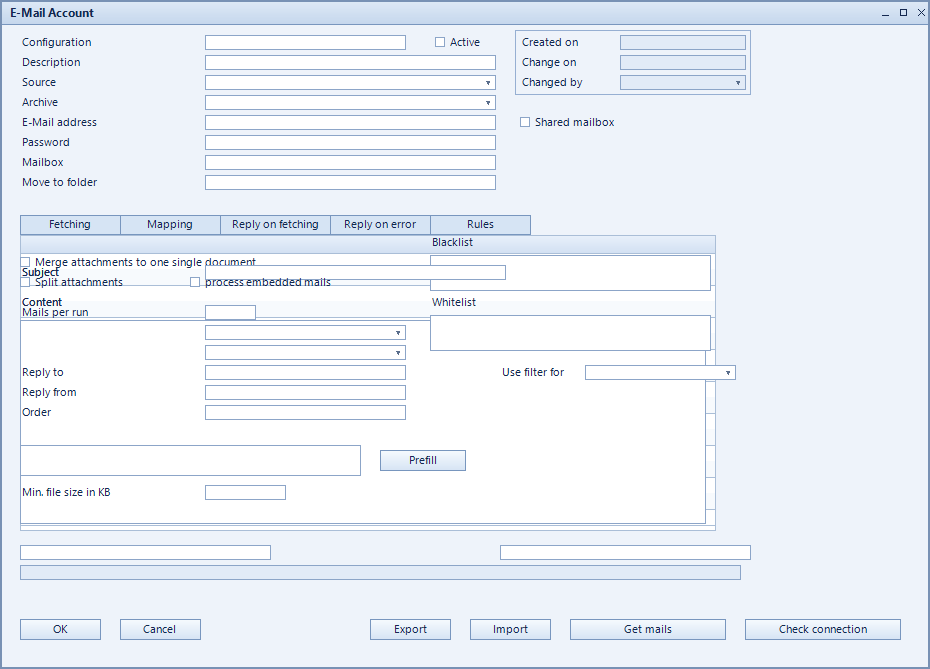
How to set it up
- Create the configuration and choose the mailbox type under source.
- For a shared mailbox tick shared mailbox and enter the shared mail address.
- Pick the source folder to monitor and the target folder messages are moved to afterwards.
- Select the ECM archive documents are filed into.
- Set the filters: only fetch mails with attachment, blacklist, whitelist and excluded file types.
- Define the behaviour: split attachments, multiple attachments save as one document, process embedded mails.
- Optionally enable auto reply after fetching and auto reply on error, then activate the account.
Fields of the form
Captions taken from the "E-Mail Account" form (table @NCSEMAIL).
| Field | Meaning |
|---|---|
| Source | Type of mailbox or access method. |
| Description | Descriptive name of the record. |
| Configuration | Unique key of the configuration. |
| Active | Enables the record. Only active records are evaluated. |
| Created | |
| Changed | |
| Changed By | |
| Shared mailbox | Marks a shared mailbox. |
| ECM Archive | Archive the messages are filed into. |
| Save from E-mail | Defines which part of the message is stored. |
| First to display | Entry shown first. |
| Shared mail address | Address of the shared mailbox. |
| Source folder | Folder being monitored. |
| only fetch mails with attachment | Messages without an attachment are skipped. |
| Exclude the following file types for attachments | File types that are not archived. |
| Auto reply after fetching | Sends the sender a confirmation of receipt. |
| Auto reply on error | Notifies when processing fails. |
| multiple attachments save as one document | Merges several attachments into one document. |
| E-Mails to read per run | Limits the number per run. |
| split attachments | Files each attachment as its own document. |
| process embedded mails | Also processes embedded messages. |
| Blacklist | Senders that are excluded. |
| Target folder | Folder processed messages are moved to. |
| Whitelist | Senders explicitly allowed. |
| Use filter for | |
| Fetching | |
| Mapping | Mapping between the fields. |
| Reply on fetching | |
| Reply on error | |
| Rules | |
| Reply to | |
| Reply from | |
| Prefill | |
| Subject | |
| Content | |
| Password | |
| Order | |
| Get Mails | |
| Min file size in KB |