
Dialog validation
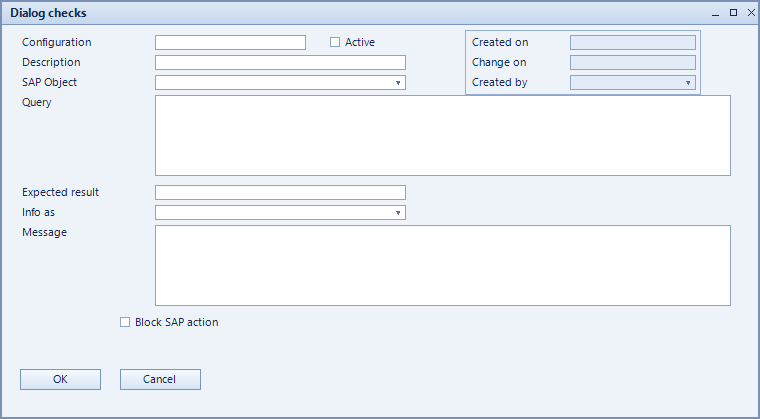
The dialog validation checks documents while the user works with them in SAP Business One. A check is an SQL query with an expected result: if the actual result differs, a message appears – and the SAP action can be blocked if required.
What is this for?
- Detect faulty or incomplete documents before they are posted.
- Point the user at the problem with a comprehensible message.
- Optionally prevent saving or posting.
How to set it up
- Create the check and choose the SAP object it applies to.
- Enter the query under SQL statement and the expected value under Result.
- Provide the text the user will see under Message.
- To prevent the action, tick Block SAP action.
Fields of the form
Captions taken from the "Dialog checks" form (table @NCSCHECKS).
| Field | Meaning |
|---|---|
| Info | Additional information about the check. |
| Active | Enables the record. Only active records are evaluated. |
| Configuration | Unique key of the configuration. |
| Description | Descriptive name of the record. |
| Result | Expected result. If the actual result differs, the check fires. |
| SQL-Statement | Query whose result is checked. |
| Message | Message shown to the user. |
| Block SAP action | Blocks the triggering SAP action instead of only warning. |
| SAP Object | SAP object the record applies to. |